


 Documentation
 Examples
 SDK Reference
 Platform API
 Changelog
WebSocket apps: All runner scaling parameters below (
keep_alive, min_concurrency, max_concurrency, concurrency_buffer, scaling_delay, max_multiplexing, request_timeout) apply to WebSocket-based apps the same as queue-based apps. See Real-Time Inference for differences in queue-level parameters like retries and priority.min_concurrency
Default: 0 Minimum number of runners always alive, regardless of traffic.concurrency_buffer
Default: 0 Extra runners kept warm beyond current demand.When
concurrency_buffer is higher than min_concurrency, it takes precedence. The system keeps whichever is higher.concurrency_buffer_perc
Default: 0 Buffer as a percentage of current request volume.The actual buffer is the maximum of
concurrency_buffer and concurrency_buffer_perc / 100 * request volume. So concurrency_buffer acts as a minimum floor for the buffer.max_concurrency
Upper limit for total runners. Prevents runaway costs.keep_alive
Default: 60 seconds Seconds to keep a runner alive after its last request. Longer values reduce cold starts for sporadic traffic but increase cost.scaling_delay
Default: 0 seconds Seconds to wait before scaling up when a request is queued. Prevents premature scaling for brief spikes.max_multiplexing
Default: 1 Maximum concurrent requests per runner. Only increase this if your handlers are async and your model has capacity for concurrent inference (e.g., enough GPU memory).startup_timeout
Maximum seconds allowed forsetup() to complete.
termination_grace_period_seconds
Default: 5 seconds | Maximum: 30 seconds The termination grace period sets the total time window between the runner receiving a shutdown signal (SIGTERM) and being forcefully killed (SIGKILL). By default, this window is 5 seconds and can be set to a maximum of 30 seconds. This time is shared between finishing in-flight requests and running your teardown() method.
A runner can be shut down for several reasons:
- Scaling down — demand has decreased and the autoscaler is removing excess runners.
keep_aliveexpiration — the runner has been idle longer than its configured keep-alive window.- New deployment — a newer revision of your application is replacing existing runners.
- Host maintenance — the underlying host requires intervention due to GPU failures, networking instability, or scheduled infrastructure updates.
SIGTERMreceived —handle_exit()is called immediately. Use this to signal your request handlers to stop processing early.- In-flight requests finish — the runner stops accepting new requests but continues processing existing ones.
teardown()runs — called after all in-flight requests complete, to clean up resources.SIGKILLsent — when the grace period expires, the process is forcefully killed regardless of whetherteardown()has finished.
teardown() to be skipped when SIGKILL arrives. See App Lifecycle for more details on the shutdown lifecycle.
During the grace period, the runner is still billed as active compute. Set this to the minimum value needed for your workload to shut down cleanly.
machine_type
GPU/CPU instance type for your runners.Scaling Examples
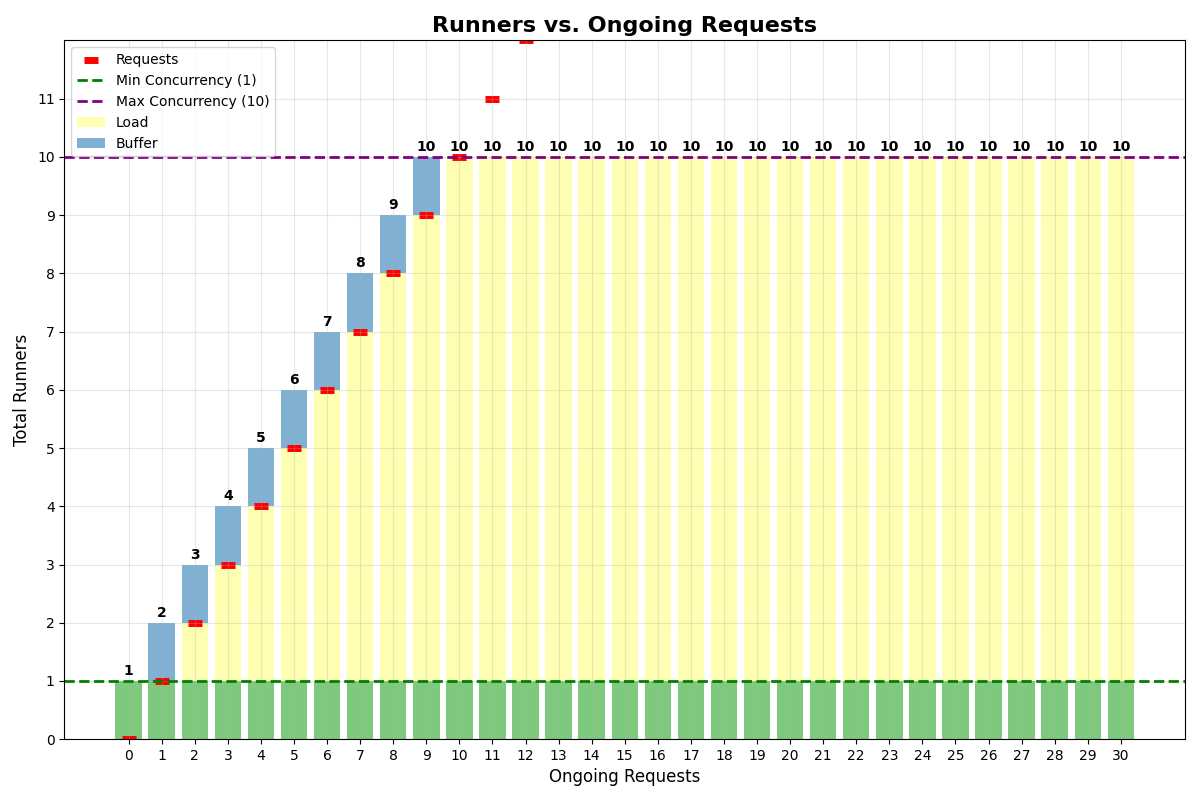
Same buffer and min concurrency
App withmin_concurrency=1, concurrency_buffer=1, max_multiplexing=1, max_concurrency=10:
No multiplexing
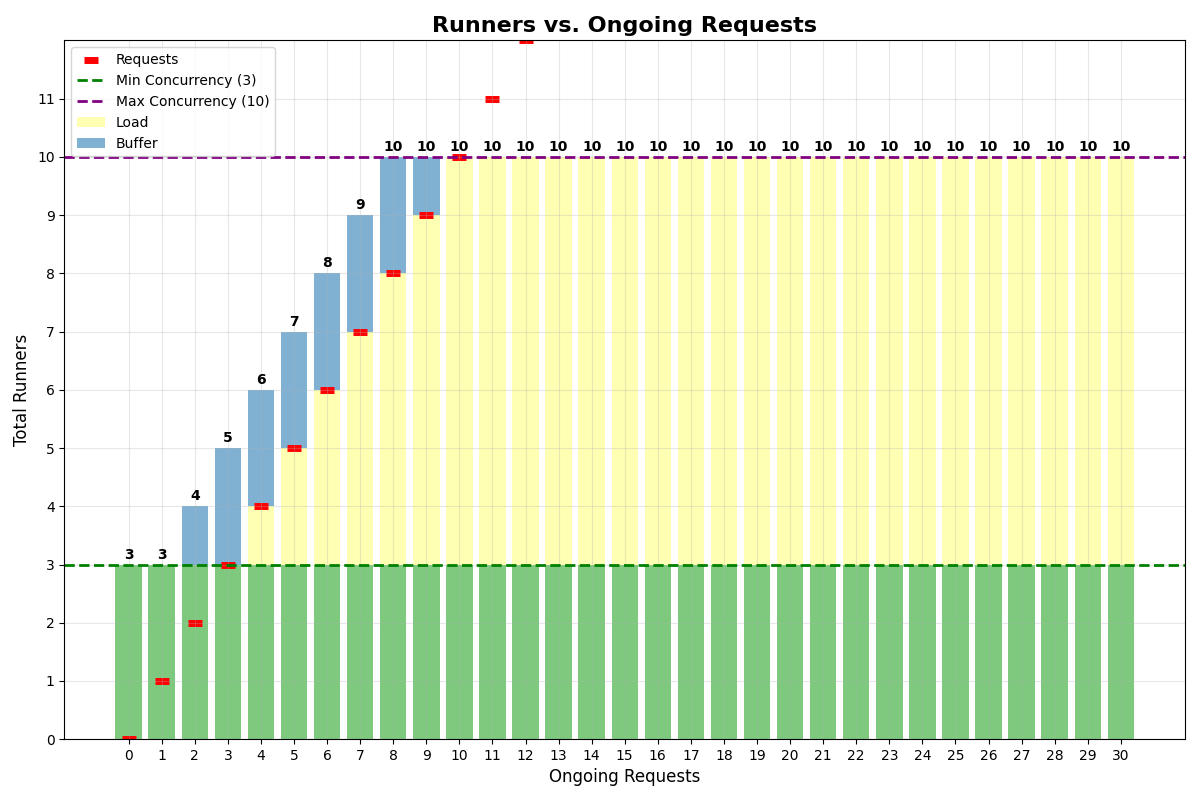
App withmin_concurrency=3, concurrency_buffer=2, max_multiplexing=1, max_concurrency=10:
With multiplexing
App withmin_concurrency=0, concurrency_buffer=2, max_multiplexing=4, max_concurrency=6:
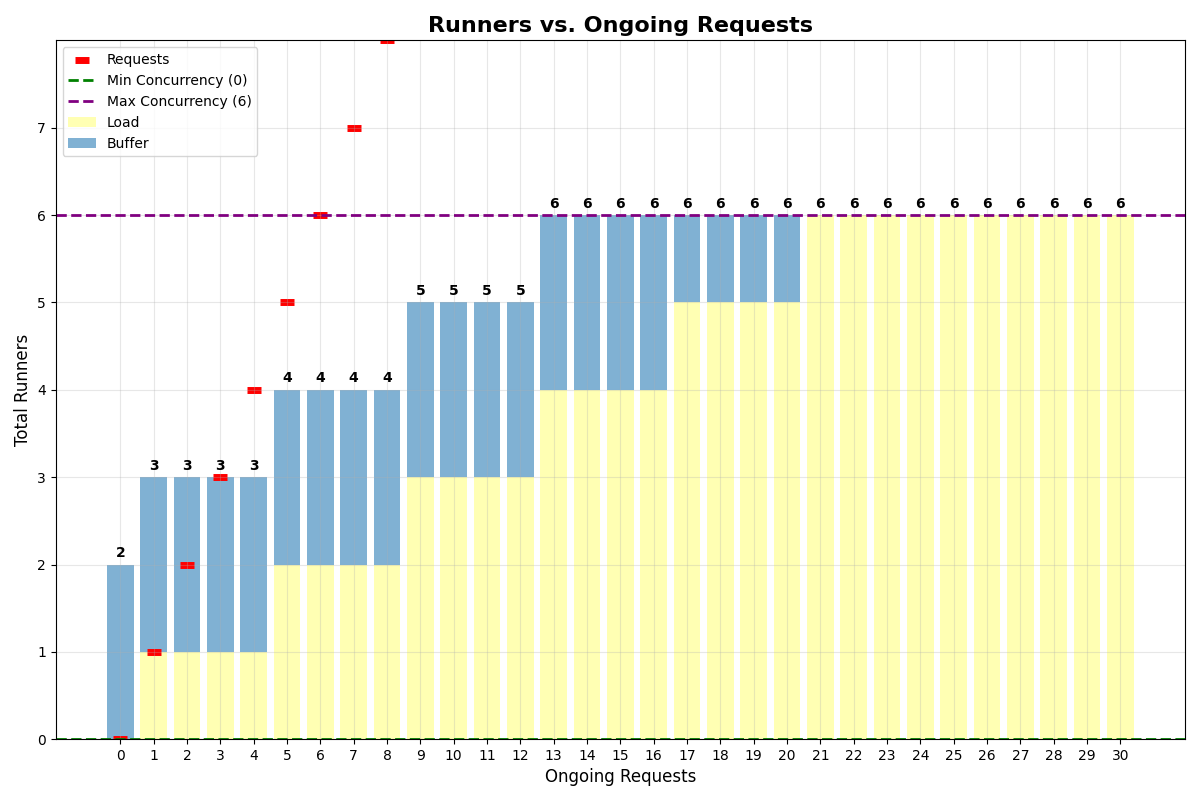
min_concurrency=0, the system keeps 2 runners alive for the buffer.
Cost Optimization
- Start conservative and adjust based on actual traffic
- Use
concurrency_bufferfor apps with slow startup instead of highmin_concurrency - Enable multiplexing when your model has spare GPU capacity for concurrent requests
- Monitor with analytics and tune parameters based on real usage patterns
- Set
max_concurrencyto prevent runaway costs during unexpected traffic spikes
Updating Your Configuration
Learn how to set parameters via code, CLI, or dashboard — and how they behave across deploys